Plugins - Odoo Helper for VS Code
The Odoo VS Code extension from Assista.
Odoo-aware completions, Go to Definition across Python and XML, module and view generators, and snippets, inside the VS Code you already use. Free.
Read the Odoo Helper for VS Code documentation
Overview
What is Cybrosys Assista: Odoo Helper for VS Code?
8,515+Installs on the VS Code Marketplace and Open VSX
Cybrosys Assista: Odoo Helper is a free Odoo extension for Visual Studio Code, published by Cybrosys Technologies, an Odoo Official Partner. It indexes the models, fields, methods, XML IDs, QWeb templates, JavaScript registries and CSS classes in your workspace, and uses that index to suggest the right names as you type, jump to definitions, and generate files for the Odoo version you work on.
It supports Odoo 18, 19 and 20. The extension reads the version from your project's odoo/release.py or the odoo pin in your requirements, shows it in the status bar, and writes code to match: the access file is ir.model.access.csv on 18 and 19 and ir.access.csv on 20, and OWL code targets OWL 2 or OWL 3.
It is also published on Open VSX, for VS Code-based editors that install from there. If you use Assista IDE, you do not need it: the IDE bundles these features.
Adding AI to your Odoo work as well? Read the guide to AI-assisted Odoo development or see how AI coding tools for Odoo compare.
How it works
Install it in a few minutes
Check the requirements
VS Code 1.85 or newer, and a folder with an Odoo 18, 19 or 20 codebase.
Install the extension
Open Extensions (Ctrl+Shift+X), search for "Cybrosys Assista: Odoo Helper" and select Install. Or run code --install-extension CybrosysTechnologiesOdooOfficialPartner.cybrosys-assista-odoo-helper.
Open your Odoo folder
The extension starts when the workspace has a __manifest__.py or an odoo/release.py. Check the status bar for the version, then type odoo in a Python or XML file. The installation guide covers Open VSX, .vsix files and every setting.
Features
What it does in your editor
Completions from your own code
Model, field, method, widget, template and CSS class names as you type, with field classes, parameters and decorators valid for your Odoo version.
Go to Definition across Python and XML
F12 from a view's field to the Python field, from a button to its method, from ref, inherit_id or t-call to the record or template, and from a manifest dependency to that module.
Module templates
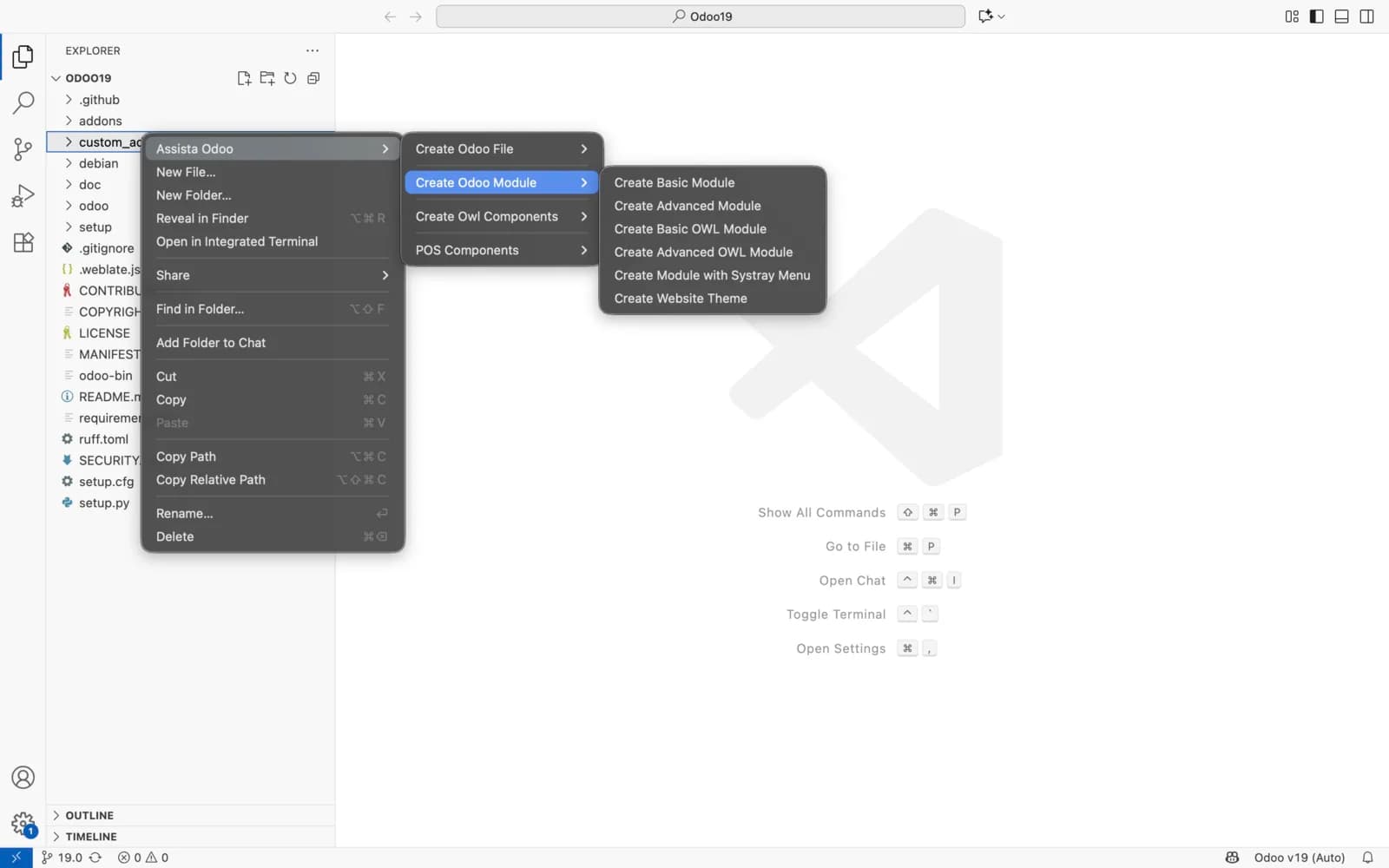
Create a basic, advanced, OWL, OWL dashboard, systray or website theme module from the Explorer, written for your Odoo version.
Views, reports and access rights from a model
Inside a model class, generate form, list, search, kanban, calendar and pivot views with an action and menu, a PDF or HTML QWeb report, or an access row. Files are added to the manifest.
OWL components and POS screens
Generate OWL components and services, and extend Point of Sale screens, for OWL 2 or OWL 3 depending on your version.
Install a module from the editor
Connect to a running Odoo server over XML-RPC, then install or upgrade a module from its folder without opening the Apps menu.
Snippets
Type odoo in a Python or XML file to insert models, fields, views and actions.
Optional coding-standard warnings
Turn on warnings based on Odoo's guidelines when you want them; they are off by default.
Works alongside OdooLS
Odoo's language server, and what this adds to it
OdooLS is Odoo's own language server, with its own VS Code extension. It and this extension do different jobs, and both are separate extensions you can install side by side. Where both offer completion or Go to Definition, you can turn off the one you don't want: this extension's indexing settings are listed in the installation guide.
OdooLS (by Odoo)
A language server for the Odoo framework: autocompletion, file validation and diagnostics, hover, go to definition and document symbols. Published by Odoo under LGPLv3.
Cybrosys Assista: Odoo Helper
Generators and editor tools on top of navigation: module templates, views, reports and access rights from a model, OWL and POS scaffolding, snippets, and installing a module on a running server.
Is the Odoo VS Code extension free?
Yes. It is free to install from the VS Code Marketplace and Open VSX.
Which Odoo versions does it support?
Odoo 18, 19 and 20. It detects the version from your project and shows it in the status bar; click it to change the version.
Do I need it if I use Assista IDE?
No. Assista IDE bundles these features, so the extension is for people who stay in VS Code.
Where are the Odoo server credentials stored?
Odoo connectivity stores the server settings, including the password, as plain text in VS Code's storage for the workspace. Use a development account.



Bring Assista into your editor.
Free on the VS Code Marketplace.