Product - Assista IDE
The AI-powered IDE for Odoo development.
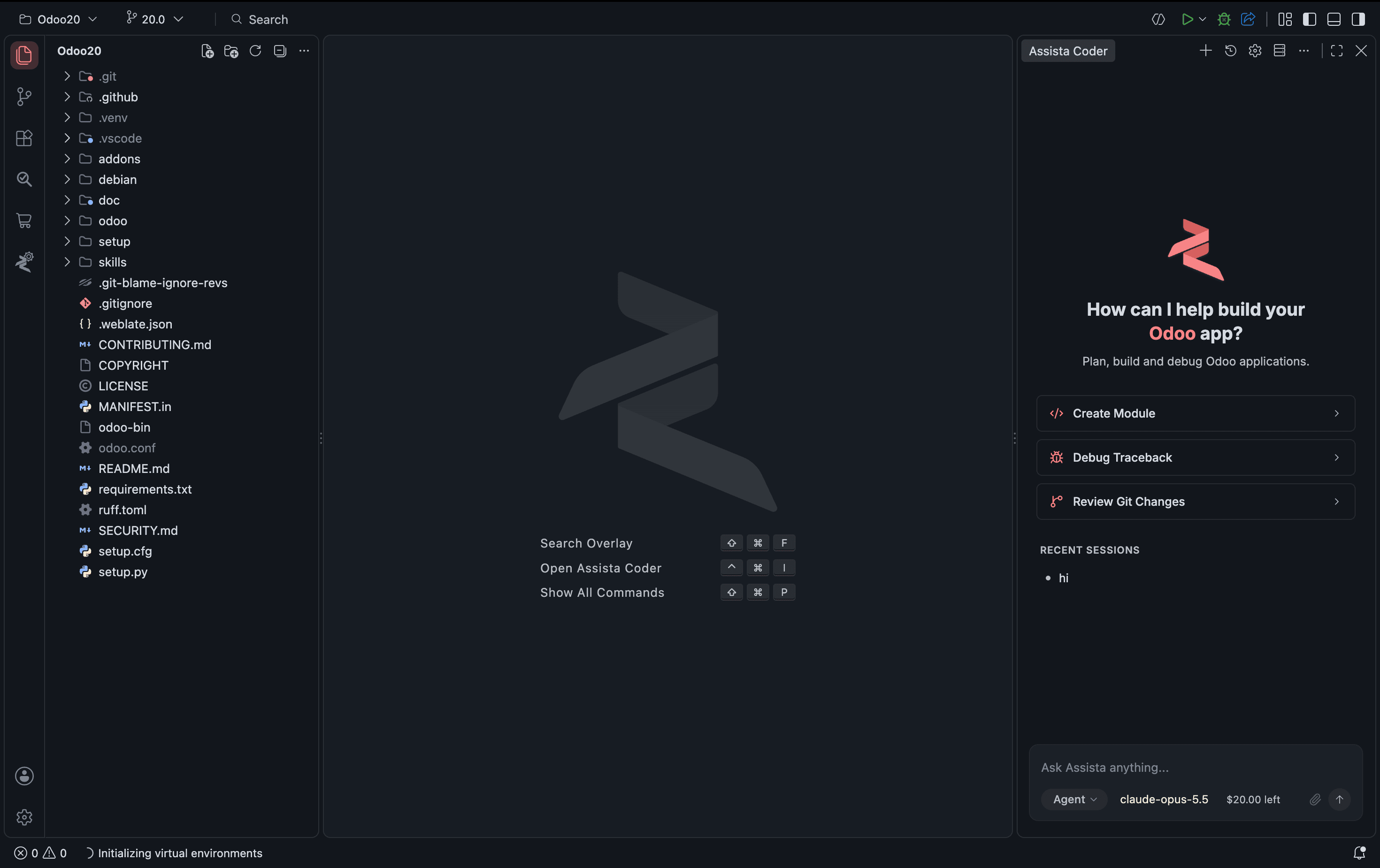
Assista IDE is a free, standalone Odoo IDE: an AI coding agent that knows Odoo's framework, plus the tools to set up, build, review and share Odoo projects.
Read the Assista IDE documentation
Overview
What is Assista IDE?
Assista IDE is a free, standalone editor for Odoo development with a built-in AI agent, Assista Coder. It is a complete editor that you install on its own, not a plugin for the editor you already have, and it runs on Windows (x64), macOS (Apple Silicon) and Linux (Snap). It works with Odoo 11 to 20.
It is made for people whose day job is Odoo: developers writing custom modules, teams maintaining an Odoo partner's client projects, and anyone who has lost an afternoon to a virtual environment that would not build. The aim is simple: less time on setup and boilerplate, more time on the module you were asked to write.
At its centre is Assista Coder, an AI agent that reads your Odoo project before it answers. You describe a change in plain language, or paste a server error and ask what it means. Assista Coder writes or explains the code, and every edit arrives as a diff you accept or reject.
The IDE and Assista Coder are free. AI requests run on Assista credits, or on your own AI provider key, which you can add in Settings.
Weighing it against a general AI editor? See how AI coding tools for Odoo compare, read the guide to AI-assisted Odoo development, or check what changed in recent Assista IDE releases.
How it works
From install to a running Odoo
Install the prerequisites
Git, a Python version that matches your Odoo release, and PostgreSQL. The prerequisites guide has the exact commands for each operating system.
Run the setup wizard
On first launch the wizard downloads the Odoo version you pick, writes odoo.conf, creates the virtual environment and configures the debugger. Every step after linking your project can be skipped and finished later.
Run and debug
Start Odoo from the title bar or with F5 and read its log in the Debug Console. Turn on Run with Debugger to stop at breakpoints in your own modules, and open Odoo in the built-in browser beside your code.
Features
Everything inside the IDE
Assista Coder
The AI agent built into the IDE. Describe what you need and it writes and edits Odoo code with you.
One-Click Environments
Pick an Odoo version. Assista downloads Odoo and sets up its Python packages; the debugger panel saves a run configuration.
Code Templates
Type a short keyword for Odoo model and view code, or right-click to create a whole module.
Module Marketplace
Search Odoo modules, filter by version and category, and download them without leaving the IDE.
Module Reviewer
Check a custom module for problems and get a quality report. Runs on your machine and uses no AI tokens.
Local URL to Public
Turn a local Odoo address into a public link you can share for demos and testing.
Built-in Browser
Open your running Odoo in a browser inside the IDE and check changes without switching windows.
Why an Odoo IDE
Odoo-aware where a general editor is not.
A general-purpose editor can edit Odoo code. Assista IDE is built around how an Odoo project is put together.
It knows your project
Suggestions come from an index of your own workspace: models, fields, methods, XML IDs and templates. After self.partner_id. you get the fields of res.partner, and you can jump from XML to the Python that defines it.
It writes version-correct code
Module, model, view, report and access-right templates match the Odoo version the status bar detects, so an Odoo 20 project gets <list> views and the Odoo 20 access-rights format without hand-editing.
One install, not a stack of extensions
Environment setup, the AI agent, code templates, module review, the module marketplace, local URL sharing and the browser ship together and are configured together. There is nothing to assemble first.
Requirements
What you need
A supported computer
Windows (x64), macOS (Apple Silicon) and Linux (Snap). There is no Intel Mac build.
Git, Python and PostgreSQL
The wizard checks for Git and Python and tells you what is missing. PostgreSQL, Node.js and system libraries are yours to install; the wizard shows the commands.
The right Odoo version
The IDE works with Odoo 11 to 20. Snippets, file generators and context-aware suggestions come from the bundled Odoo Helper and cover Odoo 18, 19 and 20.
Is Assista IDE free?
Yes. The IDE and Assista Coder are free. AI requests use Assista credits, or your own AI provider key if you add one in Settings.
Is Assista IDE a VS Code or PyCharm plugin?
No. It is a full editor you install on its own. If you would rather stay in VS Code or PyCharm, the Odoo Helper plugins bring a smaller set of the same tooling to those editors.
Which Odoo versions does Assista IDE support?
Odoo 11 to 20. The tools that come from the bundled Odoo Helper, such as snippets and file generators, support Odoo 18, 19 and 20.
Do I have to install Python and PostgreSQL myself?
Partly. Assista downloads Odoo and sets up its Python packages in a virtual environment. For PostgreSQL and system libraries it gives you guided steps to follow.
What happens to my code when I use Assista Coder?
Your prompt and the relevant code are sent to the AI model provider to produce a response. The privacy policy covers what Assista stores and for how long.



Ready to try Assista IDE?
Windows (x64) - macOS (Apple Silicon) - Linux (Snap) - Odoo 11 to 20